Built-in code list
117,064 codes come inside the app. No typing, no searching, no copying.
Part 1: Keys
Collect Nusuk keys automatically. The bot types invite codes into the Keys tab of the Nusuk app, taps Check the code, and moves on to the next one, again and again, until you have up to 8,001 keys.
In the Nusuk app, every invite code you enter gives you one extra key (and one to the person who shared it). Doing that by hand thousands of times is impossible. The Keys Bot does it for you, from a built-in list of 117,064 codes.
You open Nusuk and go to the Keys tab (button 2 in the bot opens Nusuk for you).
The bot takes the next code from its built-in list and types it into the "Add code to get new key" box.
It taps Check the code.
If the code has never been used with your account, Nusuk shows the success message and adds one key.
If Nusuk shows any error, the bot throws that code away and takes the next one. It never retries the same code.
It repeats until it reaches the number you set, until you press Stop, or until your account is full at 8,001 keys.
8,001
A Nusuk account can hold at most 8,001 keys at once. Once you reach it, new codes stop adding keys. Spend keys on the quiz, then run the Keys Bot again to fill up. Not every code gives a key: some were already swapped with you, some are no longer valid. The bot simply moves on.
Run the Keys Bot until you reach the limit.
Run the Quiz Bot. Every door costs one key.
Top up again with the Keys Bot.
117,064 codes come inside the app. No typing, no searching, no copying.
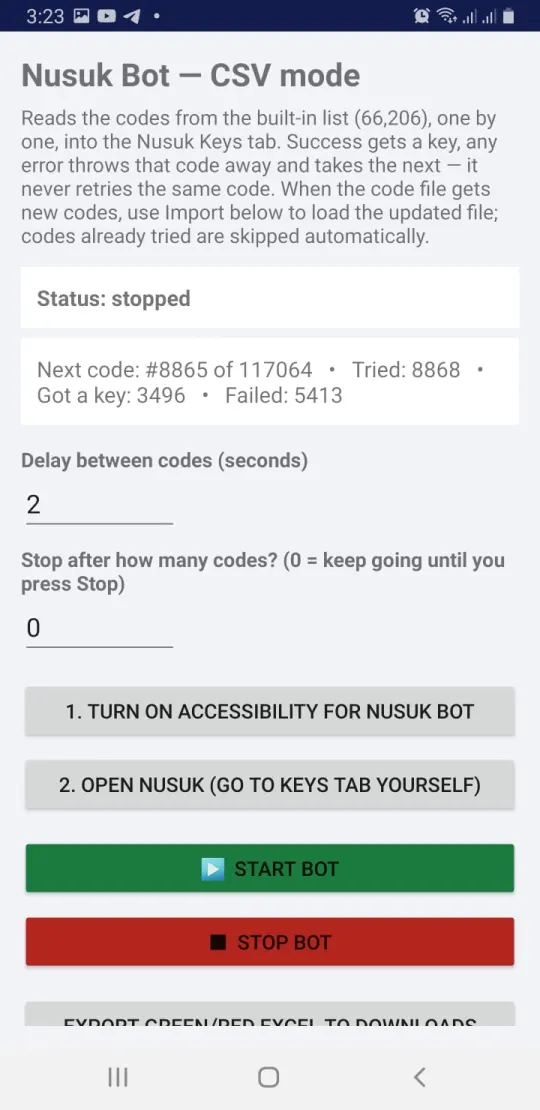
Success gets a key, any error discards the code. Codes already tried are skipped automatically, even after an import.
Set "Stop after how many codes". Type a number for a fixed run, or 0 to keep going until you press Stop.
Choose the seconds between codes. The default is 2 seconds: slow on purpose so the Nusuk app keeps up.
See the status, the next code number, how many were tried, how many gave a key and how many failed.
Progress is saved after each code, so you can stop and resume any time and pick up exactly where you left off.
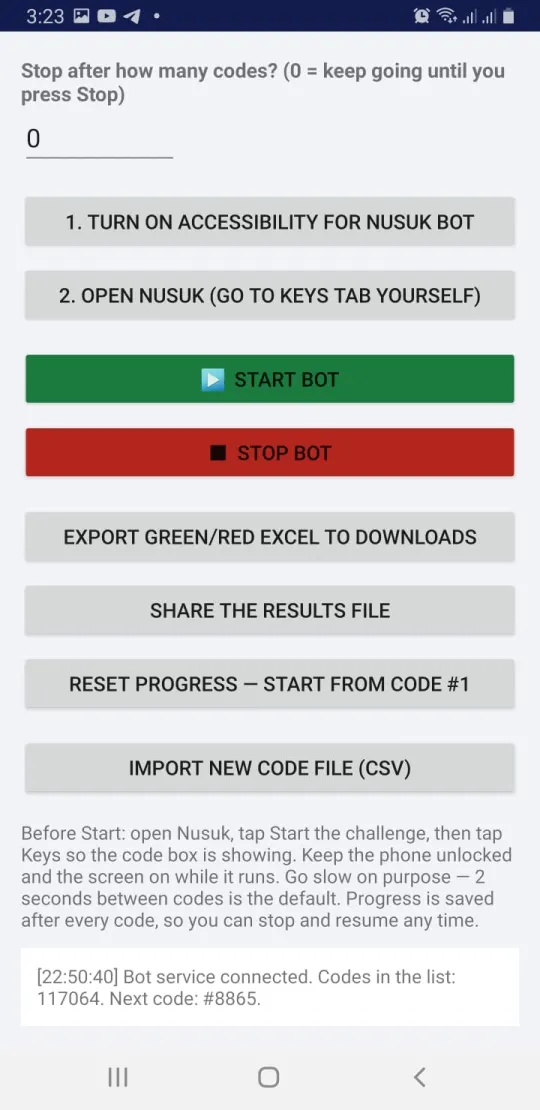
Export every result to your Downloads folder as an Excel file: green for codes that worked, red for codes that failed.
Send the results file to yourself or a friend straight from the app.
When a new code file is published, import the CSV. Old codes you already tried are skipped.
Start again from code #1 whenever you want, for example on a new Nusuk account.
A timestamped log shows what the bot is doing, so you always know it is connected and working.
It works only on your phone, inside your own signed in Nusuk app. No password, no account details sent anywhere.
Copy codes from our list and open them in Nusuk with one tap. It works on Android and iPhone.
Get free codesEverything here is free and always will be. We built these apps and this site for the sake of Allah. If they help you, please remember us, our families and the whole Ummah in your duas, especially if you are blessed to stand before the Kaaba.
رَبَّنَا تَقَبَّلْ مِنَّا إِنَّكَ أَنتَ السَّمِيعُ الْعَلِيمُ
"Our Lord, accept this from us. You are the All-Hearing, the All-Knowing." (Quran 2:127)